
- Guide3
- What's TerrainAxe?
- Make a quick menu for TerrainAxe and your ms files
- Control the Distribution of vertices on an Arc
- FAQ2
- Security Exception
- Stopped working while running(activation issue)
- Reference135
- Select(Poly)14
- SelectBorder
- RingEgs
- FcsToRingEgs
- Findborder
- Nextegs
- CoverFcs
- VertsToEgs
- InnerVerts
- InnerEgs
- FacesByID
- AdjFcsByID
- SameDirFaces
- GetQuadFaces
- RoadSides
- Create(Poly)18
- StitchPoly
- QuickStitch
- SweepEdge
- PiecePoly
- PlaceMesh
- StitchVerts
- PCloudToMesh
- AppendPoly
- LoftSplines
- FreePoly
- ShapeEdge
- DragPoly
- CapEdges
- CrossRoads
- Stairs4
- FreeStair
- IrregularStair
- FacesToStair
- CapStairSides
- Construct(Poly)23
- CurveFitting
- MoveVerts
- InsertX
- ProjToFace
- ConformToRoad
- AdvConnectVts
- ZAlignFace
- ZAlign3P
- SlopePlanar
- Round Verts4
- RoundVerts
- RoundVts(3P)
- RoundVts(Rad)
- RoundVts(TT)
- Smooth Road6
- SMRoadByLines
- SmoothRoad
- SMRoad(Linear)
- SMRoad(NPts)
- SMRoad(Blur)
- SMRoad(Curve)
- Weld Tools4
- Weld1VertToEg
- Weld2VertsToEg
- SuperWeld
- WeldVerts&Egs
- Cut(Poly)18
- ConnectVerts
- Cut2Egs
- Cut2Verts
- PivotCenBot
- CutByAgl
- CutBydir
- CutPerToEdge
- EvenConnect
- ClearJags
- Slice
- SliceByEdges
- SliceByLines
- SliceByFcs
- SliceXY
- SliceByGrid
- SliceBy3P
- Trianglate(Faces)
- EncloseVerts
- UV(Poly)8
- IDByElm
- IDByFace
- PaveCourts
- RingMap
- Advanced UV Mapping4
- RoadPaver
- PaveNoTear
- PaveWall
- Advanced UV Tools
- Others(Poly)14
- SnapToP
- MoveOnDir
- SnapZ
- ZMove
- AdvClearMidVts
- ClearMidVerts
- Flatten Edges
- RightAgl
- ClearChaosEgs
- IDSet
- Check_NarrowFcs
- Extend
- ClearDarkVerts
- ExtendVerts
- Render6
- AbsorbMat
- ArrangeMats
- SimpleTerrMat
- MtlNeaten
- UvwCamera
- Vrcam
- Scenes5
- TrafficLineSys
- AdvArray
- Collapse
- RoadNetwork
- UCS
- Common21
- DropToTerrZN
- DropToTerrain
- CCWShp
- FreeSpline
- FlatShps
- RefRotate
- MoveObjs
- Explode
- SubdivSpls
- DwgImport
- BlackWire
- DelEmptyObj
- Copy
- Paste
- PickPivot
- ClearSel
- ConnectKnots
- LockTransform
- ResetFile
- ResetXform
- BBoxToTerrain
- Manager8
- AxeSetting
- Clean Layers
- Simple Display
- QuickMenu
- LifuBar
- UIMan
- On/Off TheAxe
- SegsVsArc
- Select(Poly)14
PlaceMesh
Introduce
Embeds one or more polygon surfaces (such as roads or flat areas; must be single-sided objects) into another surface.Embed one or more polygon surfaces(such as road or a flat area,must be single side object) into another surface.
PlaceMesh
How To
Parameters
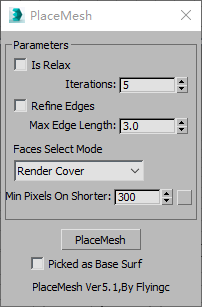
PlaceMeshUI
IsRelax
Applies the Relax function of Editable Poly to newly created faces to make them smoother.
Refine Edges
Inserts vertices on edges that are longer than the value of “Max Edge Length” to prevent long and narrow faces.
Face Select Mode: Switches to face selection mode.
Intersect:Uses the getIntersect function of MaxScript to select overlapping faces.
Note: This method may not work reliably in newer versions of 3ds Max.
Render Cover:Renders an image to determine which faces need to be selected.
Picked as Base Surface
By default, the picked object is treated as the upper surface (such as a road or water surface).
If this option is checked, the picked object will instead be treated as the terrain surface.
Tips
Note That
Don't include unnecessary structures ,such as buildings,stairs or complex pavement.
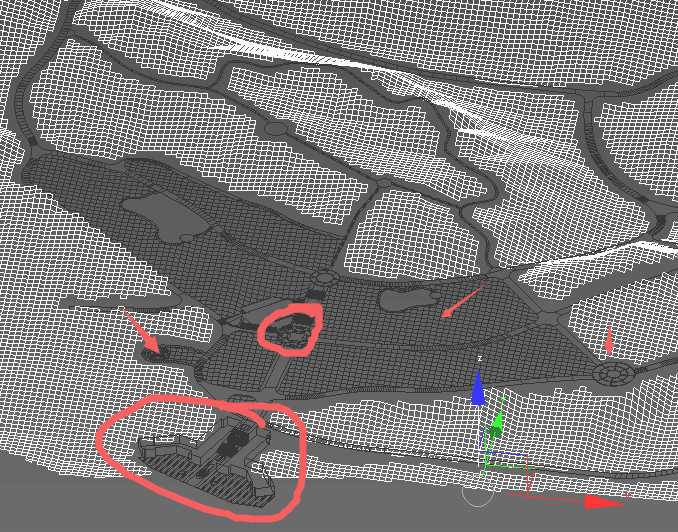
wrong structures